Capture
The guest selects a configured service and the hotel captures the request with room context.
Hotel technology · Digital Room Service
Home / Hotel Guest Request Management Software
Organize guest requests, staff assignment, task progress and completion in one operational workflow.
Explore plans & free trialExplore the demoGuest requests can be lost between reception, housekeeping and maintenance. A centralized queue makes the request visible, identifies an eligible team and lets staff update progress.
Guest-facing experiences and staff-facing operations should remain connected. Hotels should test real workflows, including unusual cases, before relying on any automated assignment or guest-status updates.
Operational accountability
Hotel guest request management connects the guest's original need with the team accountable for delivery. A request queue should make it clear what was received, who is working on it and what happens when nobody is available.
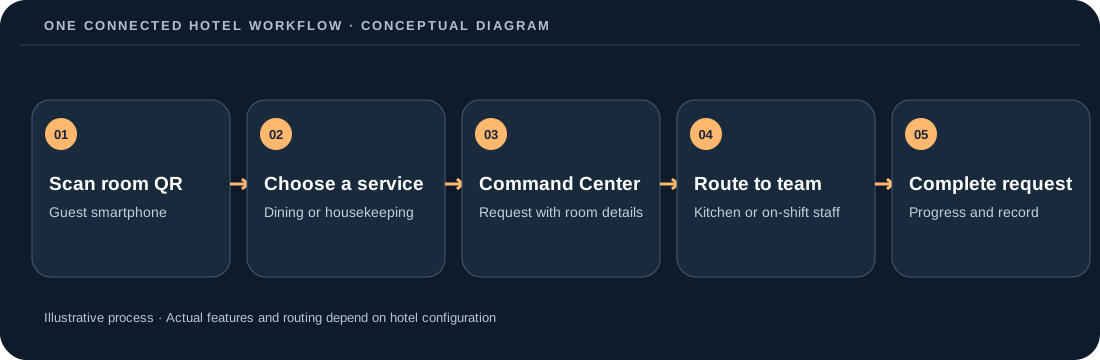
The guest selects a configured service and the hotel captures the request with room context.
Operations routes work to the relevant team, using manual assignment or validated optional automation.
Team members update progress and complete the request so the manager can inspect exceptions.
Use this capability as part of a connected guest-to-staff hotel workflow.
Use this capability as part of a connected guest-to-staff hotel workflow.
Use this capability as part of a connected guest-to-staff hotel workflow.
Use this capability as part of a connected guest-to-staff hotel workflow.
Set up service categories and teams, require a mapped team before publishing a service, and test the staff check-in and assignment workflow.
Confirm room configuration, team eligibility, kitchen mapping where applicable, guest-visible pricing and subscription limits. Validate a full request from submission to completion before distributing QR cards to guests.
Digital Room Service offers feature-inclusive plans differentiated by hotel capacity. Choose annual or quarterly billing and review prices in your local currency on the pricing page. Monthly equivalents and per-room comparisons are informational only; they are not monthly billing options.
Integration availability varies. Do not assume a property-management system, payment terminal or third-party POS is connected without confirming a supported integration.
No. The guest-facing QR experience opens in a mobile browser.
The platform is designed to work on common connected devices. Confirm printer and operational needs for your property.
Annual and quarterly billing options are available. Prices and limits depend on your selected plan and country.
Explore related hotel workflow · Staff coordination · QR card generator · Contact
A digital service catalog can capture housekeeping, towels, maintenance and other requests with room context and notes.
Define a responsible team, check who is on shift, and use a manager-controlled fallback if nobody is eligible for a request.
Managers need a clear view of unassigned work, time-sensitive requests and reasons a task cannot be completed. Guests should see accurate status after a task is completed.
Compare response and completion time by request type, with the acknowledgement and room resolution recorded as separate events.
Check actual mobile browser behavior on iPhone and Android, including QR scans, menu images, scrolling, form validation and order confirmation.
Ask how managers view the queue, override assignment, recover blocked orders and trace status changes after a shift handover.
Test country-specific tax configuration against the amount shown in the guest experience, the order confirmation and final room bill.
Determine which screens continue to function, whether updates are retried safely and how reconciliation works once devices reconnect.
Set a baseline for response time, order completion, staff touches and guest complaints; compare results after staff training and a controlled rollout.
Separate the guest request catalog from the staff assignment configuration. Each service needs a responsible operational team and a sensible estimate of duration. When a request arrives, show managers the originating room, requested time, service notes and current stage. Only checked-in, eligible staff should receive direct assignment when automation is enabled.
Requests without available staff must remain visible, not silently disappear. Managers need clear queue and escalation paths, staff need understandable active and upcoming work, and guest status must reflect real completion rather than merely the assignment event.
Name the person responsible for the guest-facing catalog, the staff team mappings, the property settings and the reporting review. Document who may publish changes, who handles requests outside normal shifts and how handover is conducted. Test each role with real permissions before guests use the system.
Confirm the operational owner can edit the relevant catalog or station while ordinary staff cannot inadvertently change the whole hotel setup. Include handover instructions for the next shift and retain a manual fallback.
Use straightforward language, a stable phone-friendly layout and meaningful button text. Confirm that guests can distinguish an order submission from payment collection and can locate their order history. Offer an alternative contact channel for guests who cannot use a QR code.
Check a 320-pixel mobile viewport, readable pricing, screen-reader-friendly labels, and that a guest can return to the status view after navigating away. Translate guest-facing wording only when it has been professionally checked.
Use a controlled test room and create a complete journey: open QR, choose a product or service, submit, acknowledge, assign, complete and review the record. Repeat with changed quantities, a cancelled item, a temporarily unavailable staff member and interrupted connectivity. Record who fixed each failed step.
Test a second request from the same room, a paused item, a missed staff assignment and an order where kitchen readiness occurs before a delivery employee is free. Compare the guest screen with manager records.
Train the front desk to explain the QR journey and the manager to locate unassigned requests. Train kitchen staff on their station statuses and delivery staff on ready items. Rehearse manual intervention when automation is disabled, when nobody is checked in or when a request misses its target time.
Have an employee explain each possible request state and the way to escalate an exception. Verify a manager can find stalled items and that completed work no longer appears as upcoming.
Select measurable operational events: scan-to-order conversion, acknowledgement time, preparation time, delivery completion, service request backlog and guest-reported problems. Compare metrics before and after a controlled rollout rather than treating a theoretical benefit or an estimate as a guaranteed saving.
Review the numerator and denominator for each metric: a QR scan differs from an order, an accepted request differs from a fulfilled request and a forecast saving differs from observed staff time.
Clarify what is managed inside the service platform and what still lives in an existing property-management or payment system. A manual room bill or recorded external payment is not automatically proof of an integrated payment transaction. Define reconciliation ownership and test the final total, tax display and room reference.
Verify the visible total at the guest screen and any cashier or room statement. Do not advertise a direct PMS or terminal integration unless the hotel has actually configured and tested that integration.
Yes. Select a handful of rooms, map a limited service catalog, train a small team and observe actual room-to-team handling before wider distribution.
Treat digital guest operations and property management as separate responsibilities unless an integration has been explicitly confirmed. Plan any manual reconciliation.
Measure completed guest journeys, exceptions, staff handoffs, wait times and pricing consistency in the test property, using the same definitions each week.
Make the request visible to managers, show why a staff member was ineligible and provide a clear manual route to completion without inventing a successful assignment.
Keep an assisted ordering route available. The digital path should complement guest choice while giving staff a consistent operational record when practical.
Before making a wider deployment decision, document a named pilot owner and a backup, the rooms and staff roles involved, the currently supported handoff process, and the precise event that counts as guest-facing completion. Review which failures a manager can correct and which require technical support. Check performance on hotel Wi-Fi and mobile data without assuming every visitor has a current device. Keep a log of the test orders and requests, but avoid using real guest personal information in training materials. When the process is stable, agree on publication ownership and a schedule for reviewing menus, staff mappings and guest instructions. Compare a complete working shift with the original process, including exception cases, and make the expansion decision using that evidence rather than estimates or marketing projections.
Request tracking is useful when the front desk, housekeeping and managers can see the same accountable handoff.
| Stage | What the hotel needs to know | Example exception |
|---|---|---|
| Submitted | Room, requested service, time and current status | Guest submits a towel request while staff are busy. |
| Assigned or offered | Who can take the work, whether the staff member is checked in | No eligible team member is available. |
| In progress | Who owns the task, and whether the team has begun | A task is accepted but not completed promptly. |
| Completed | Outcome and closure status | A guest reports a missing amenity; manager can review the record. |
| Needs manager attention | Why the request could not be routed or finished | Staff coverage is unavailable or an offer expires. |
For a new pilot, enable only services with a responsible operational team. Establish an exception owner and test the manual fallback before adding more guest-request categories.
These resources answer separate hotel-buying and implementation questions.
Use these practical resources to evaluate real workflows, set up a controlled launch and calculate costs using your hotel's assumptions.