Identify the right room
Place a QR code in the guest room so the service journey opens in the correct context. Before activating a code, verify the room mapping and property settings.
Help guests scan one room QR for in-room dining, housekeeping requests and hotel information. A practical setup guide for independent hotels.
A room QR code is a scannable entrance to a hotel-controlled guest experience. It is not merely a link to a PDF menu.
Place a QR code in the guest room so the service journey opens in the correct context. Before activating a code, verify the room mapping and property settings.
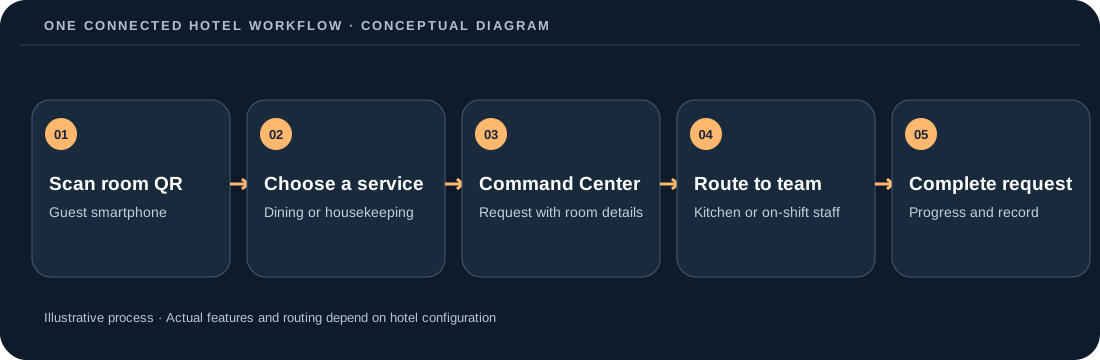
Guests can browse available room-service items, amenities and hotel information through a mobile browser, without a mandatory app installation.
The hotel receives the request in its operations workflow. Staff can handle it manually or use the configured Autopilot routing rules where available.
Guest accessibility and clean room mapping matter more than the number of printed codes.
| Location | What to include | What to check |
|---|---|---|
| Bedside card | “Scan for room service, towels and hotel information” with short printed fallback URL | Test readability in low light; do not obscure the QR with branding. |
| Guest information folder | A concise service description and help-desk fallback | Keep service categories consistent with the live room QR experience. |
| Desk or amenity tray | Small water-resistant card if the property needs another touchpoint | Avoid duplicate codes with different room mappings. |
| Accessible alternative | Printed room-service number or reception contact | Support guests who cannot use a smartphone or scan a code. |
Use a controlled five-room pilot to catch setup mistakes before a full-property rollout.
All three are QR experiences, but the operating requirements differ.
| Type | Main job | Behind-the-scenes requirement |
|---|---|---|
| Hotel room QR code | Connect a specific guest room with dining and property services | Room context, current guest access, staff ownership, and checkout/reset procedures. |
| Hotel QR menu | Let guests discover food, drinks, modifiers and pricing | Menu accuracy, availability, kitchen handoff and billing policy. |
| Digital hotel compendium | Provide Wi-Fi, amenities, opening times and property guidance | Clear information ownership and a simple publishing workflow. |
A QR scan is only the start: managers also need to see the completion path.
Answers about scope and implementation—not a substitute for a property-specific pilot.
Use a room-specific configuration where room identification is required for fulfilment. Pilot the correct room mapping before printing your whole property.
The DigitalRoomService guest experience runs in a browser and does not require a mandatory app installation or guest account.
Yes. QR is an additional channel; hotels should keep an accessible alternative for guests who prefer telephone or reception help.
Use the hotel’s session-closure and room-reset controls. Confirm the exact access rules for your configuration before launch.
Start with a few rooms, test the guest QR, verify staff ownership and confirm how orders and requests are closed. Keep non-QR assistance available.
Use these practical resources to evaluate real workflows, set up a controlled launch and calculate costs using your hotel's assumptions.