Staff efficiency
Spend less time on repetitive coordination and more time serving guests. Model released staff capacity without assuming payroll reductions.
DIGITAL ROOM SERVICE · SMART HOTEL OPERATIONS
The future of hotel service is on AI Autopilot. Smart staff assignment in seconds.
Digital Room Service software is an AI-powered hotel room service and guest request management platform. Guests scan a room QR code to order food, request housekeeping and access hotel services, while Autopilot helps coordinate staff assignments.
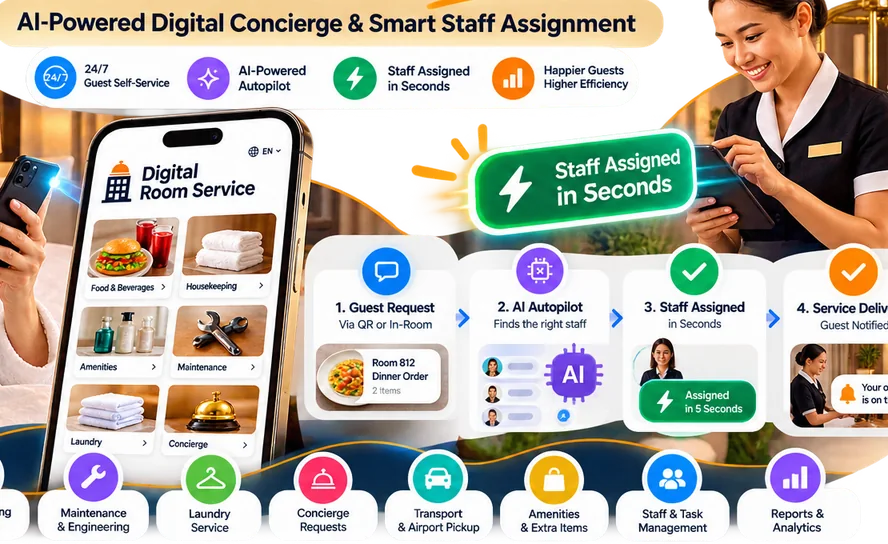
Illustrative workflow. Staff assignment timing depends on hotel settings, staff availability and connectivity.
Explore hotel QR ordering, room QR codes, room service software, guest request management and hotel software pricing.
THE ART OF EFFORTLESS SERVICE
See how Digital Room Service connects a guest's simple request to the people who can fulfil it. Explore three ways hotels can use the platform.
Guests browse the hotel menu and send a room-linked food order. The hotel manages preparation and delivery in its connected workflows.
Explore the hotel platform
Choosing hotel software? Start with the workflow you need to improve. Guests use a room QR in their phone browser; your team receives the corresponding order or request in the right operational queue.
QR dining menus, order capture, kitchen preparation and delivery coordination.
Explore room-service workflow →Guest QR and digital compendiumOne in-room access point for guest information, dining and hotel service requests.
Explore guest experience →Hotel guest request managementRequest intake, team assignment, visible status and optional supported automation.
Explore staff coordination →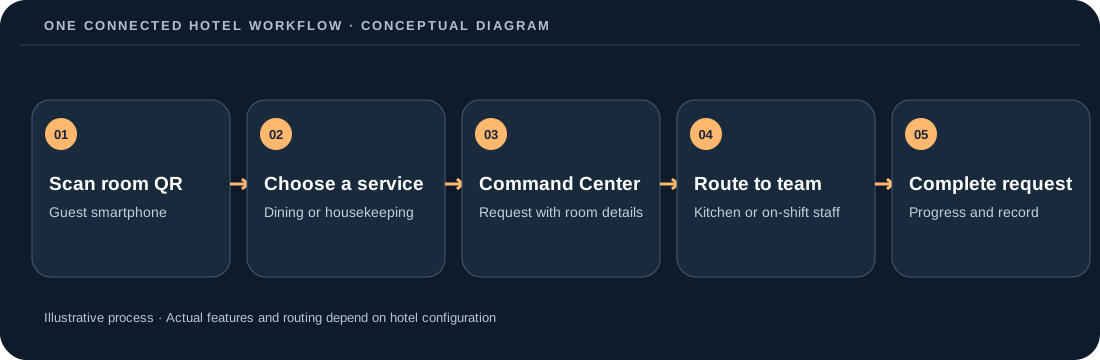
DigitalRoomService is not a hotel PMS or payment processor. Hotels should verify how room charges and external systems are handled in their configuration.
A MORE CONNECTED HOTEL
DigitalRoomService brings guest QR ordering, service requests, staff coordination and optional AI Autopilot into one browser-based hotel workflow. Model potential business value using your own assumptions.
Spend less time on repetitive coordination and more time serving guests. Model released staff capacity without assuming payroll reductions.
Help guests discover hotel dining more easily. Explore potential additional food sales as a scenario, not a forecast.
Support intelligent allocation while keeping manual hotel operations available.
Guests scan their Room QR to browse dining and request services. Staff scan their hotel access QR and enter a secure PIN to manage work. No separate guest or staff app download is required. Managers use the existing Command Center on supported phones, tablets and desktops.
Scan the Room QR. Browse dining and hotel services. Order or request without installing an app or creating an account.
Use a lightweight browser workspace reached through QR + PIN. View assignments, start or complete service, and optionally verify work with the Room QR.
Use the same platform across desktop, tablet or mobile to monitor Command Center, assign staff, manage rooms, and open Billing when needed.
Explore the guest journey, the people delivering it and the tools that help a hotel manager stay in control.
Room-specific dining and hotel service requests, guest order history and facility information.
Explore room service →Incoming work, staff ownership, service progress and operational exceptions in a shared view.
Explore operations →Existing employee task workflows connected to hotel-defined teams and QR staff check-in.
Explore attendance →When enabled and available, intelligent task offers use checked-in staff and workload context.
Explore Autopilot →SMART OPERATIONS AUTOPILOT
With Autopilot enabled, valid food orders can move directly to KDS, and eligible staff can receive service tasks without an accept/reject delay. Busy teams use Smart Queue and the shared Team Task Pool; exceptions return to the manager.
Checked-in, qualified and available employees receive eligible work immediately.
Explore →Keep upcoming work visible with configured staff capacity limits.
Explore →Unresolved or unstaffed requests remain visible for manager action.
Explore →Autopilot automation and cloud-device behavior are undergoing product validation; availability depends on the hotel configuration. Hotels can always operate manually.
The guest scans the room-specific QR and opens the browser experience.
Choose in-room dining or request housekeeping, towels, laundry, maintenance and other hotel services.
Command Center brings new orders, service requests, assignments and attention items into one operational view.
Kitchen and hotel staff complete the request, with a room bill recorded independently of food delivery.
Dining orders and hotel-service requests share the same room context while keeping the right fulfilment workflow for kitchen, housekeeping, laundry, maintenance and other teams.
ONE FOOD ORDER, TWO CONNECTED JOURNEYS
A room order can be accepted automatically or by a manager. Master KDS sees all food items; optional Category KDS screens focus on their categories. Kitchen readiness triggers the Food Delivery workflow, while Auto Bill to Room parks an outstanding invoice without interrupting preparation.
One consolidated kitchen view plus optional category-filtered companion displays.
Explore →When food is ready, eligible delivery staff can be assigned through existing task workflows.
Explore →Park room charges automatically. The existing manual billing and printing workflow remains available.
Explore →Room charges and payment settlement are tracked separately from order preparation and delivery.
Guests can use the same Room QR to order food and beverages or request hotel services without downloading an app. Each request keeps the room context your team needs to fulfil it.
Menus, categories, modifiers, ordering and billing built for hotel-controlled room service.
Room cleaning, fresh towels and amenity requests can be routed as operational service requests.
Guests can request laundry pickup or luggage assistance with preferred-time and note context.
Create hotel-specific services and assign the right team without forcing every request through a phone call.
Room Guest Sessions expire, hotels can close or reset access when a room is released, and optional GEO verification can require a new Room order or service request to originate within the hotel's configured property boundary.
Staff can reach a lightweight browser workspace through the hotel's Staff Access QR, view assignments, manage shifts, start or complete services, and optionally verify service touchpoints using the Room QR.
One hotel Staff Access QR with employee-specific secure PIN verification.
Current, queued and completed work stays clear on the staff member's own device.
Staff update service status directly, keeping Command Center current.
Room QR and employee badge touchpoints support operational verification without continuous tracking.
HOTEL TEAM EXPERIENCE
Use the same connected system with role-appropriate views—without adding another installed app for guests or staff.
Task-centric Staff Portal, queued work, shared team tasks, shift status and attendance.
Explore →Weekly coverage planning, time off, shift schedules and a guided setup flow.
Explore →Room-wise operational activity, outstanding bill shortcuts and requests needing attention.
Explore →Model room-service revenue uplift, contribution margin, average order value, staff-capacity value, device CapEx avoidance and printed-menu costs using your own assumptions. No uplift is assumed or guaranteed.
Calculate Your Hotel ROIUse practical comparison guides to evaluate guest friction, staff operations, room security, hardware requirements and lifecycle cost before choosing an approach.
A mobile ordering experience built around behavior guests already understand: scan, browse, choose and order.
Orders arrive digitally with the room and order context needed to move from request to fulfillment.
Rich menu organization, modifiers and clear item presentation make the full in-room dining offer easier to discover.
Update menu items, pricing and availability digitally instead of reprinting physical menus.
Experience eight interactive steps, from room QR cards and digital guest services to team coordination and optional Smart Operations Autopilot. No sign-up required to explore.
Explore the hotel launch journey →Scan the QR with your phone to open The Aurelia Hotel — Room 1208, the actual Digital Room Order guest application in safe demo mode. Browse dining, request hotel services, place a demo order and use the same guest UI hotels deploy.
FOR HOTEL OWNERS AND OPERATIONS TEAMS
Plan staffing, understand room-service margins and use ready-to-adapt operational templates. No signup needed.
A clear guide to the guest experience, hotel workflow and technology behind digital room service.
QR ORDERINGHow room QR codes connect the guest to the right menu and hotel context.
OPERATIONSWhere digital ordering fits into an in-room dining operation without replacing hospitality.
Start with hotel room service software or hotel operations software, then choose your region or topic:
No. Guests scan the Room QR and use Digital Room Order in their browser. A mandatory guest account is not required.
Yes. Hotels can configure services such as room cleaning, fresh towels, laundry pickup, toiletries, maintenance, luggage assistance and custom service requests alongside in-room dining.
Room ordering uses temporary Room Guest Sessions. Hotels can close or reset room access when a room is released, and can optionally require GEO verification before accepting new Room orders or service requests.
No. When a hotel enables location verification, location is checked for a new protected request against the hotel's configured property boundary. Digital Room Service does not use the feature for continuous guest tracking.
No. Staff can use a browser-based workspace accessed through the hotel's Staff QR and their secure PIN to view assignments, manage shifts and update service work.
Yes. The current platform supports property-level operating currencies including USD, AED, GBP, EUR, SGD, THB, IDR, INR and AUD. Local tax configuration remains the hotel's responsibility unless specifically supported by a verified tax profile.
Choose the specific guest or operations workflow you need, rather than comparing broad software categories.
Plan room mapping, printed QR placement and checkout access rules.
Put a usable digital menu in front of guests and pass orders to the team.
Connect a guest concierge-style interface with accountable staff handoff.
Find practical explanations of guest ordering, staff coordination, and hotel service operations.
HOTEL TECHNOLOGY INSIGHTS