Guest ordering
Confirm the guest can read the menu, adjust quantities, submit an order and understand what happens next without installing an app.
Hotel room service software for digital menus, room QR ordering, order operations, menu management and in-room dining workflows.
Before you buy hotel room-service software
A digital menu alone is not a complete room-service workflow. Test the connection between the guest's room number, menu availability, kitchen display, staff handoff and payment record before committing to a full rollout.
Confirm the guest can read the menu, adjust quantities, submit an order and understand what happens next without installing an app.
Verify which team sees each incoming item, how staff update progress, and who handles room delivery.
Check whether the hotel records a bill-to-room entry manually or uses a supported external billing workflow. Do not assume an automatic PMS integration.
Software buyer's field guide
Digital room service software is a hotel-operated system that lets guests use their phone to request in-room dining and other services, while hotel teams receive the request with the right room context. The deciding factor is not whether a QR code opens a menu. It is whether the request can be tracked from the guest to the team responsible for completing it.
Can a guest see availability, modifiers, notes and the correct room before confirming an order? Test a real menu rather than a static PDF.
Can reception, housekeeping and kitchen staff see which requests are new, assigned or awaiting action? Test an exception when a staff member is unavailable.
Can managers configure service hours, staff responsibilities, room access and room-billing records without assuming the software replaces a PMS or payment processor?
Best suited to hotels seeking a browser-based guest request and room-service workflow. Hotels needing a reservation PMS, payment gateway or guaranteed third-party integrations should verify those capabilities separately.
At minimum, the system should make it easy for the guest to identify the right menu, place a clear order and attach the correct room context. For the hotel, it should keep menu information current and present incoming orders in an operationally useful way.
CONNECTED HOTEL OPERATIONS
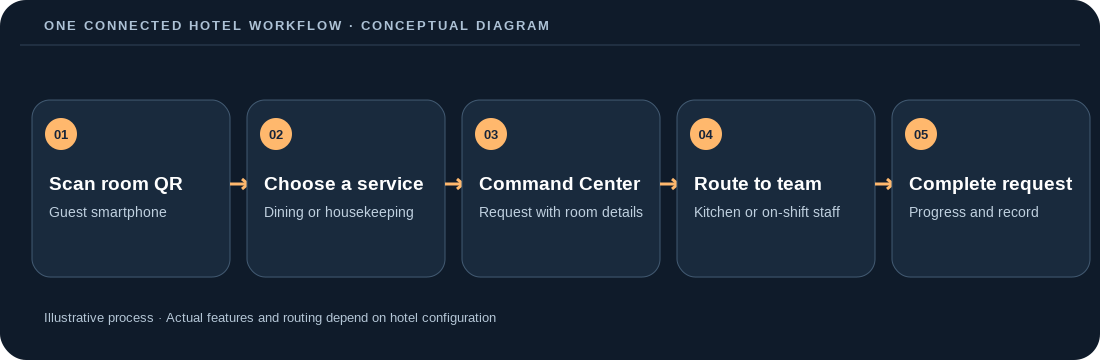
Learn how a Room QR order moves to Master KDS, team delivery and optional room billing without replacing your existing manual workflows.
PRACTICAL HOTEL CHECKLIST
A guest menu is only the front end. Hotel room-service software must also help teams receive, prepare, hand over and reconcile the same order.
Manual staff and kitchen coordination are part of the core offering. AI-driven task assignment is an optional upgrade.
DigitalRoomService combines guest-facing room QR access with operational order and service-request workflows. Evaluate fit around your existing kitchen, reception and housekeeping processes; this is not a claim of full property-management-system replacement.
Compare plans · Model your own potential ROI · United States hotel guide · France hotel guide · Italy hotel guide
The guest-facing room service experience runs on a phone browser, while hotel teams use the kitchen display, staff task views and Command Center to coordinate preparation and delivery.
See the product demoUS-first country/tax setup, items, modifiers, availability, station mapping.
Room-specific QR; server-side guest session (24 h default) revoked on room release.
Cart with notes enters Command Center with room context.
Kitchen advances tickets; Ready is not the same as Delivered.
A hotel staff delivery task is created and tracked.
Optional auto bill-to-room records an outstanding room bill; settlement stays in your PMS/POS.
| Approach | Guest access | Hotel-side workflow | Typical trade-off |
|---|---|---|---|
| Phone line + paper menu | Call the front desk or kitchen | Handwritten ticket, verbal handoff | Low cost, but no audit trail and busy lines at peak |
| Static QR / PDF menu | Scan to view a PDF | None, orders still by phone | Cheap to print; no order routing or room context |
| In-room tablets | Dedicated device per room | Usually vendor-managed | Hardware purchase, charging, theft and cleaning overhead |
| Branded guest app | Download and log in | Varies by vendor | Download friction for one-night US stays |
| Browser-based room QR platform (DigitalRoomService) | Scan the room QR, no download | Command Center, KDS, staff tasks, room billing records | Needs reliable Wi-Fi/cellular and a hotel setup pass |
General categories, not claims about any named vendor. Evaluate each product on its own documentation.
Compare all six room capacities, Operations and AI Copilot editions, and annual or quarterly billing in one place.
DigitalRoomService US plans are fixed per property: Essential $89/yr (10 rooms), Signature $179/yr (25), Elite $299/yr (50), Grand $499/yr (99), Royal $749/yr (149). Quarterly billing is also available.
No. Guests scan the room QR and order in their phone browser.
No card capture in the menu. Charges can be recorded to the room bill and settled in your PMS/POS, so PCI scope stays with your processor.
Yes. Publish a small menu, or only services such as towels and housekeeping, and keep the kitchen display optional.
No. It is not a reservation PMS or a payment gateway.
QR menu software and room-service software are closely related but are not identical. The useful test is whether an order can be fulfilled.
These resources answer separate hotel-buying and implementation questions.
Use these practical resources to evaluate real workflows, set up a controlled launch and calculate costs using your hotel's assumptions.